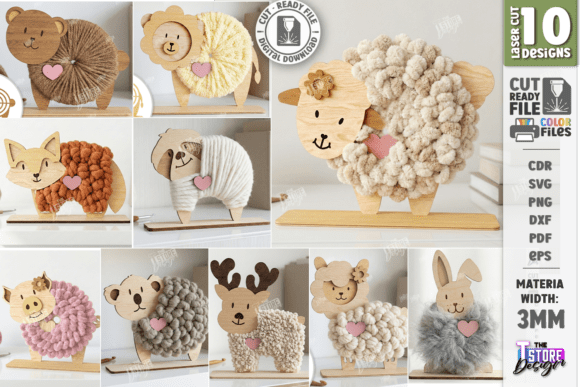
Charming DIY Nursery Decor: Yarn Wrapped Animals Laser Cut Bundle
What's Inside the Digital Bundle
The versatility of this asset bundle is one of its strongest features. Upon purchase, you receive a zip archive containing everything you need to start creating immediately. The package is thoughtfully organized to support a wide range of workflows and preferences.
- 10 SVG files - Ideal for most vector-based software.
- 10 DXF files - The recommended format for users of Lightburn software to prevent dimension distortion.
- 10 EPS files - A standard vector format for broader compatibility.
- 10 PNG files - High-resolution images for reference or other applications.
- 10 PDF files - For easy viewing and printing of templates.
It's important to verify that your specific cutting machine and software can handle these file types. The creator is also open to providing alternative file formats or customized PNG sizes upon request, ensuring the templates work perfectly for your project.
Creative Applications for Your Laser Cut Files
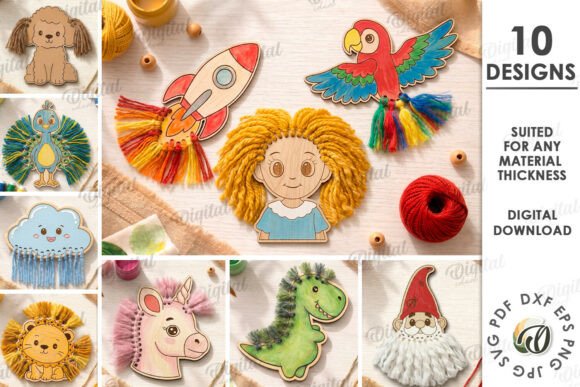
The potential uses for these 3mm plywood animal cutouts extend far beyond simple wall art. They are fantastic for developing interactive children's activities that promote fine motor skills and sensory exploration. The yarn-wrapping process itself is a calming, focused task for kids.
Consider these project ideas:
- DIY Nursery Decor: Create a set of adorable, textured animals for a nursery wall or shelf.
- Sensory Toy Development: The combination of smooth wood and soft yarn provides a rich tactile experience.
- Interactive Storytelling Props: Use the finished animals as characters in imaginative play.
- Handmade Gifts: A personal, crafted gift that parents and children will treasure.
- Classroom or Playgroup Activities: A structured, creative project for group settings.
For the best results, using 3mm plywood is suggested, as the designs are calibrated for this material thickness. The precision of the laser file ensures clean cuts and crisp engraved details, which are essential for a polished final product.
Tips for a Smooth Crafting Experience
To ensure your project goes smoothly, a little preparation helps. If you are using Lightburn software, the creator specifically advises using the DXF file format over SVG to avoid any potential issues with scaling or distortion. Always perform a small test cut on a scrap piece of your chosen material to fine-tune your machine's power and speed settings for both cutting and engraving.
When it comes to the yarn, choose colors that complement your nursery palette or a child's favorite hues. The engraved lines provide a helpful guide for where to wrap, making the activity accessible. This bundle is more than just a set of **cut files**; it's a foundation for creating meaningful, hands-on projects that blend technology with traditional craft. It represents a modern approach to **design assets**, offering both efficiency and a deeply personal, handmade aesthetic.